

Life Insurance

Shriram Life Insurance Login: Customer Portal Guide

Gargi Thakur

Written by Gargi Thakur

Editor

Gaurav Bhat

Reviewed by Gaurav Bhat

IRDAI-Certified Expert at Ditto

SP0738578124

Certified
Shriram Life Insurance Login: Customer Portal Guide

Overview

You can log in to your Shriram Life account through the Shriram Life customer portal after a one-time registration.

How to Access Your Account?

  • Customer Portal Login: Log in with your user ID (your registered mobile number) and password, or with your registered mobile number and a One-Time Password (OTP) sent by SMS.
  • New Account Registration: First-time users can sign up on the “Create Your SLIC Account” page with their mobile number, policy number, name, date of birth, and email ID.
  • Pay Without Logging In: Pay renewal premiums through Quick Pay using your policy number and date of birth, or download your premium-paid certificate.
  • Mobile App: Manage your policy on the go with ShriMithra, Shriram Life’s Android app.

Customer Support

Call the toll-free helpline at 1800-103-6116 (Monday to Saturday, 9 AM to 8 PM) or email customercare@shriramlife.in.

Since April 1, 2024, IRDAI has required insurers to issue all new policies in electronic form, which you can store in an e-insurance account. That makes your insurer's online account the easiest place to manage your policy. The Shriram Life Insurance login gives you that access, but only after a one-time registration. 

Once you’re set up, you can download policy documents, pay premiums, and track your policy without visiting a branch. 

In this guide, we break down how to register and log in, what you can do online, how to use the ShriMithra app, how to fix common login problems, and how to reach customer care.

Shriram Life Insurance Login: Customer Portal and Registration

Unlike some insurers, Shriram Life asks you to create an account on its customer portal before you log in for the first time.

How to Register?

1) Go to the Shriram Life customer portal and click "Register Now" below the "Login" button.

2) In "Mobile Number (User ID)", enter your mobile number. This becomes your user ID.

3) Enter your policy number, first name, last name, date of birth, and email ID ("Mail ID").

4) Create a password, enter it again in "Confirm Password," and click "Register Now".

Note: Enter your name and date of birth exactly as they appear in your policy document, so the portal can match them with Shriram Life's records.
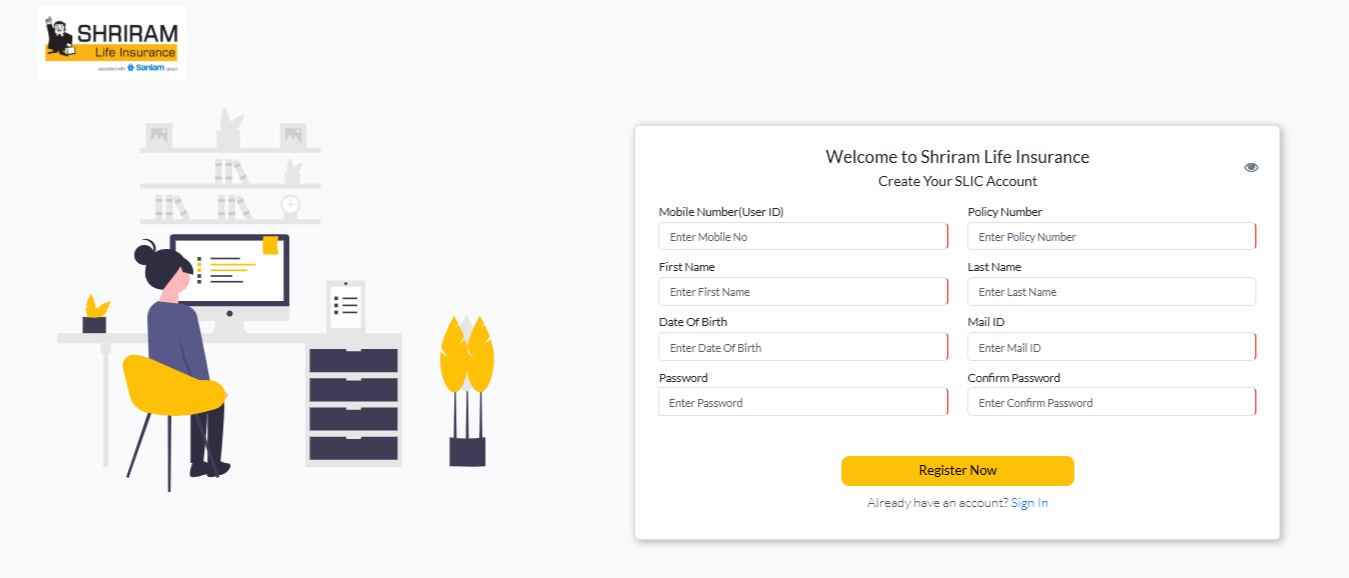
Shriram Life customer portal

How to Log In?

You can log in to the Shriram Life customer portal in two ways:

    • User ID: Enter your user ID (your registered mobile number) and password, type the CAPTCHA, and click "Login". Click the refresh icon if the CAPTCHA is hard to read.
    • Mobile Number: Enter your registered mobile number. Shriram Life sends an OTP by SMS. Enter it and click "Submit".

Once you're in, you can see the policies linked to your account.
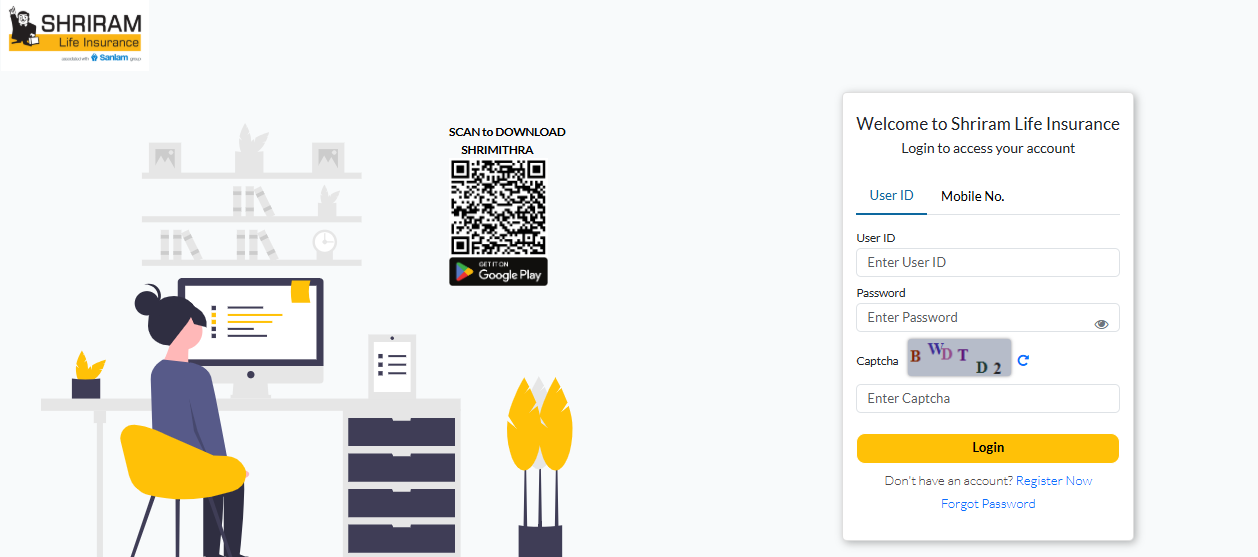
Shriram Life Insurance Login

Note: Log in only through Shriram Life's official website. Never share your password or OTP with callers who claim to be from Shriram Life or IRDAI.

What Can You Do After Shriram Life Insurance Login?

According to Shriram Life, its customer portal covers everything from accessing policy details to completing payments. After logging in, you can:

Check Policy Details

See the details of the policies linked to your account.

Pay Premiums

Pay your renewal premiums online before the due date, so your policy doesn’t lapse.

Download Your Premium Paid Certificate

Get it from the Premium Paid Certificate section for tax filing.

Update Your Details

Change your address, Aadhaar, or PAN without visiting a branch. For an address change, upload a signed scan of your new address proof.

Note: You don't have to log in to pay a premium. On Shriram Life's Quick Pay page, enter your 14-character policy number and the life assured's date of birth, or your mobile number. You can pay through UPI, a credit or debit card, net banking, or EMI on a credit card.

You can also download your premium paid certificate without logging in on Shriram Life's premium paid certificate page.

Talk to an expert
today and find
the right
insurance for you.

Ditto Advisor

How to Log In to Shriram Life Insurance via the Mobile App?

Shriram Life's customer app is ShriMithra, available only on Android through the Google Play Store.

To use it, download ShriMithra, then add your policy by verifying it with an OTP. According to Shriram Life, the app lets you:

    • Pay renewal premiums through the "Quick Pay" option.
    • Update your address, Aadhaar, or PAN.
    • Change your nominee or premium payment mode.
    • Download your premium paid certificate.
    • Raise service requests.

Note: If you want to change your premium payment mode, for example from yearly to monthly, send the request at least 90 days before your policy anniversary. The change applies from the anniversary date.

To avoid missing a premium, you can also set up auto-debit through Shriram Life’s E-NACH mandate activation. 

Shriram Life Insurance Login Problems and How to Fix Them

Most login problems come down to registration or the details you enter. Here's how to fix the common ones:

    • Can’t Log In at All: You may not have registered on the portal yet. Click “Register Now” and create an account with your mobile number and policy number.
    • Forgot Password: Click “Forgot Password”, enter your user ID, and set a new password.
    • Registration Fails: Your name or date of birth may not match Shriram Life’s records. Enter both exactly as they appear in your policy document.
    • OTP Not Received: Your registered mobile number may have changed, or you may have reached the OTP request limit. Wait for the timer and click “Resend OTP”, or log in with your user ID and password. If your number has changed, contact customer care to update it.
    • CAPTCHA or Page Errors: Click the refresh icon for a new CAPTCHA. If the page still doesn’t load properly, clear your browser cache or try another browser.
    • Wrong Website: Shriram General Insurance and Shriram Finance are separate companies with their own portals. Make sure you’re on Shriram Life Insurance’s customer portal.

Shriram Life Insurance Customer Care and Support Contacts

If you can’t log in or need help with your policy, use the following official Shriram Life channels. You’ll find them all on Shriram Life’s Reach Us page.

ChannelContact DetailsAvailability
Toll-Free Number1800-103-6116Monday to Saturday, 9 AM to 8 PM.
WhatsAppSend "Hi" to 90155 02000 for premium receipts, certificates, renewal payments, and detail updates.24/7
SMSSend "STAT <policy number>" to 9246033344 for policy status, "DUES" for premium dues, or "LPRT" for the last premium received.-
ShriA ChatbotClick "Chat with ShriA" at the bottom right of Shriram Life's website.-
Emailcustomercare@shriramlife.in (claims: claimsupport@shriramlife.in)Not applicable.
BranchesUse the Branch Locator on Shriram Life's website.Branch hours vary.


If your complaint isn't resolved, write to grievance.redressal@shriramlife.in. If you're still not satisfied, contact the Head Office Grievance Redressal Officer at gro@shriramlife.in or 040-23009400. You can also raise a complaint on IRDAI's Bima Bharosa portal. If you don't get a response within 15 days, you can approach the Insurance Ombudsman.

For more on the insurer, read our Shriram Life Insurance review.

Why Choose Ditto for Life Insurance?

At Ditto, we’ve assisted over 12,00,000 people with choosing the right insurance policy. Why customers like Aaron below love us:
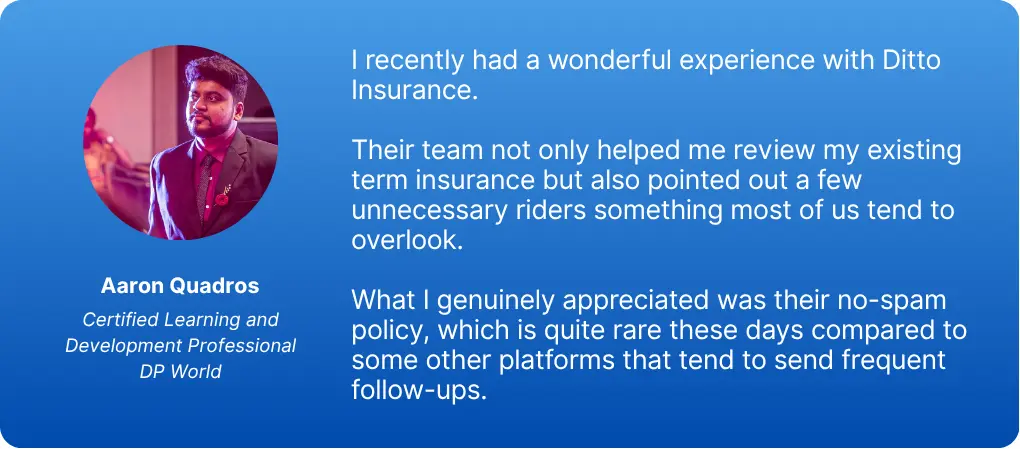
Aaron Quadros LinkedIn Testimonial
    • 100% Free Consultation
    • No Spam. No Sales Pressure.
    • Rated 4.9/5 on Google Reviews by 30,000+ Happy Customers
    • Backed by Zerodha
    • Dedicated Claim Support Team
    • Compare Plans and Premiums with a Trusted Insurance Advisor

You can book a FREE consultation. Slots are running out, so make sure you book a call or chat on WhatsApp now!

Conclusion

The Shriram Life Insurance customer login makes it easy to manage your policy online, from checking policy details and paying premiums to downloading your premium paid certificate and updating your details. After a one-time registration, you can log in with your user ID and password or with your registered mobile number and an OTP.

Keep your mobile number updated with Shriram Life so you don’t miss OTPs. If you only need to pay a premium, Quick Pay lets you do it without logging in, and Shriram Life customer care can help with any login issues. 

Frequently Asked Questions

How can I reset my Shriram Life Insurance login password?

Go to the Shriram Life customer portal and click "Forgot Password" below the "Login" button. On the "Reset Your Password" page, enter your user ID (your registered mobile number), then enter a new password and confirm it. Click "Reset" to save it. If you can't reset it, call 1800-103-6116 (Monday to Saturday, 9 AM to 8 PM) or email customercare@shriramlife.in.

How can I download my Shriram Life Insurance policy document after logging in?

Log in to the Shriram Life customer portal and open your policy details. If you can't find the policy document there, email customercare@shriramlife.in with your policy number, or call 1800-103-6116. Since April 1, 2024, IRDAI has required insurers to issue new policies in electronic form, so you can also keep your policy safe in an e-insurance account.

Can I log in to Shriram Life Insurance without a registered mobile number?

No. Your mobile number is your user ID on the Shriram Life customer portal, and you need it to register. If your number has changed, update it with Shriram Life first by calling 1800-103-6116, emailing customercare@shriramlife.in, or visiting a branch. Until then, you can still pay premiums through Quick Pay and download your premium paid certificate with your policy number and date of birth.

Can I log in to Shriram Life Insurance using my PAN instead of my policy number?

No. The Shriram Life customer portal doesn't offer PAN-based login. You log in with your user ID (your registered mobile number) and password, or with your registered mobile number and an OTP. You need your 14-character policy number only once, when you register. If you've lost your policy number, call 1800-103-6116 or email customercare@shriramlife.in with your details.

Can I download my Shriram Life Insurance premium receipt after logging in?

Yes. After logging in, go to the Premium Paid Certificate section to download it. You can also get it without logging in: on Shriram Life's premium paid certificate page, enter your policy number, date of birth, and the financial year, then verify with an OTP. WhatsApp at 90155 02000 offers both premium receipts and premium paid certificates 24/7, and the ShriMithra app does too.

Can I update my mobile number or email address on the Shriram Life Insurance portal?

To update either, call 1800-103-6116 (Monday to Saturday, 9 AM to 8 PM), email customercare@shriramlife.in, or visit your nearest branch. Keep your policy number handy. Once the update is done, you can log in or register with your new mobile number. You can also raise a request through Shriram Life’s service request page.

What should I do if I do not receive an OTP while logging in to Shriram Life Insurance?

First, check that you entered the mobile number registered with Shriram Life and that your phone has network coverage. Wait for the timer to end, then click "Resend OTP". The portal limits how many OTPs you can request, so if you've hit that limit, log in with your user ID and password instead. If your number has changed, call 1800-103-6116 or email customercare@shriramlife.in to update it.

How can I check my Shriram Life Insurance policy status?

Log in to the Shriram Life customer portal to see the details of the policies linked to your account. Without logging in, send an SMS with "STAT" followed by a space and your policy number to 9246033344. You can also send "Hi" on WhatsApp to 90155 02000, which handles policy-related queries 24/7, or call 1800-103-6116 (Monday to Saturday, 9 AM to 8 PM).

Can I log in to Shriram Life Insurance with my policy number?

Not directly. Shriram Life Insurance login with policy number isn’t available, since the portal works with your user ID (your registered mobile number) and password, or your registered mobile number and an OTP. You need your policy number to register for the first time. Without logging in, you can use your policy number to check your policy status by SMS and, with the life assured’s date of birth, pay premiums through Quick Pay and download your premium paid certificate.

Last updated on: