

Quick Overview

Health Insurance Card is an ID from your insurer that proves you have health coverage and helps you access medical services, especially cashless treatment at network hospitals, through direct billing and less paperwork. It contains your personal details, policy number, and coverage info, and works like a medical ID to verify eligibility and start cashless procedures quickly.

Save your health insurance card offline and share it with family, it speeds up cashless admission at network hospitals. For what is actually covered, rely on the policy document, and call the insurer or TPA helpline if you cannot download the card.

Imagine you are at a hospital reception. The staff asks for your policy details, and your mind goes blank for a second. This is exactly where a health insurance card helps.

A health insurance card is a quick way to pull up your policy and insurer or TPA (Third Party Administrator) details during admission, especially if you are trying for a cashless claim. In this article, we will walk you through what a health insurance card is, the types, how to download a health insurance card, how to use it, and the difference between health insurance card and policy document.

What is a Health Insurance Card?

The HDFC ERGO health insurance card shown above is a sample health insurance card. It is a quick ID linked to your policy that helps a hospital pull up your coverage details during admission.
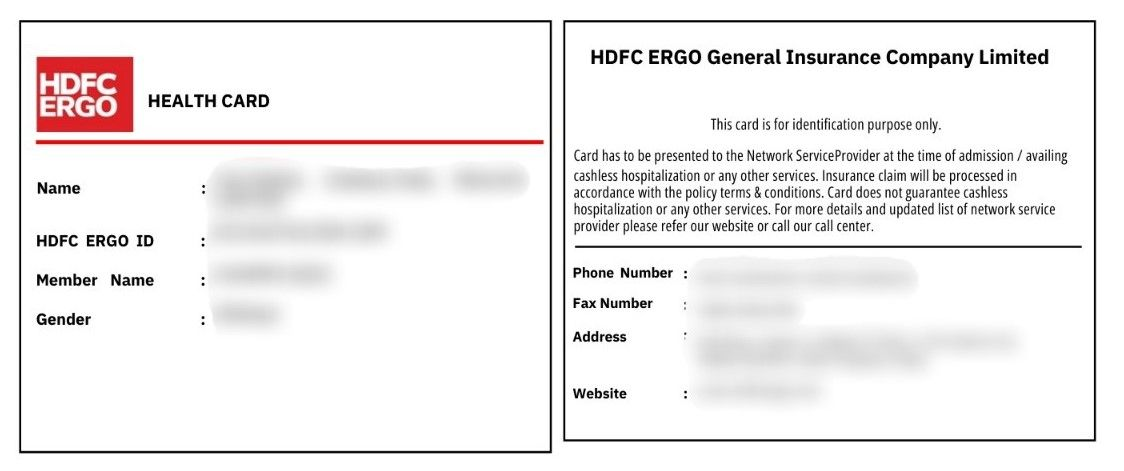
HDFC ERGO Health Insurance Card

Why it's Important: A health insurance card makes it easier to route your case to the right insurer or TPA, which can speed up cashless processing.

What Information Is Printed: Usually: name of insured person, policy or member ID, insurer name, TPA or helpline number, and validity dates.

Benefits of Health Insurance Card

Easy Access to Cashless

At a network hospital, the card helps the hospital desk quickly identify your insurer or TPA and pull up your member details. This speeds up the first step of cashless, which is starting pre-authorization.

Policy Details Always Handy

Your policy number, member ID, and validity dates are right there, on the card. So you are not scrambling through emails or PDFs at the admission counter. Think of it as a shortcut to fetch your details quickly, not a replacement for the policy document.

Quick Contact with Insurer

Health insurance cards list the insurer or TPA helpline. If the hospital needs clarity on where to send documents or whom to coordinate with, one call can save a lot of back-and-forth.

Less Paperwork Friction

A card makes it easier to share basic identification details during claims, especially when the hospital or insurer needs quick verification. Just remember, approvals still depend on your policy terms and the medical documents submitted.

Types of Health Insurance Cards

TypePurposeCommonly Found
Physical cardHandy backup at admission if your phone is not reachable.Older policies, policies issued by government health insurance companies, some group plans, occasional welcome kits.
Digital card (e-card)Quick to show, save, and share during admission.Insurer website or app download section, TPA portal, insurer email or WhatsApp, policy issuance email
App or QR cardFast lookup by QR scan inside insurer or TPA systems.Insurer mobile app, TPA app, some corporate health portals that show a QR card inside the app

Note: Most insurers no longer issue physical cards. Digital cards are widely accepted. Your digital card is often included at the end of your policy document PDF. The digital card can be printed and laminated to keep it safe.

CTA

How to Download Health Insurance Card?

If you need it right now, start here: open your policy PDF and check the last few pages. Many insurers place the digital health insurance card at the end of the policy document.

Step 1: Check Your Inbox and Policy Documents

    • Search your email or SMS for “e-card” or “health insurance card”
    • Open your policy PDF and scroll to the end
    • Save the card PDF to your phone for offline access

Step 2: Download from the Insurer app or Website (Retail Policies)

    • Open the insurer app or website
    • Log in using your registered mobile number or email 
    • Go to My Policies or Policy Documents
    • Download health insurance card or policy document

Step 3: Health Insurance Card for Group or Corporate Policies 

    • Ask HR for the insurer name and the TPA name 
    • Go to the TPA portal or app and look for Download e-card
    • Enter your employee ID or member ID and date of birth
    • Or ask your HR to share the health insurance card
    • Download and save the e-card

Note: If you cannot download health insurance card, log in with the registered number and ask the insurer or TPA helpline to resend it (keep your policy number and DOB handy).

How to Use Health Insurance Card

Save and Share

Keep the digital health insurance card on your phone and share it with family.

Show at Admission

At the help desk, show the card along with a valid photo ID.

Ask for Cashless Processing

Confirm it is a network hospital and request pre-authorization to start the cashless process.

Use the Helpline

Call the number on the card if the hospital needs insurer or TPA support.

Difference Between Health Insurance Card and Policy Document

BasisHealth Insurance CardPolicy Document
What it isQuick ID linked to your policyFull contract of your plan
Main useHelps hospital find your policy fastShows what is covered and not covered
Details includedBasic member and policy detailsBenefits, limits, exclusions, rules
Used during claimsHelpful at admission deskUsed to confirm eligibility and terms
Where you find itInsurer app or at end of policy PDFShared as a PDF after issuance

Why Choose Ditto for Health Insurance?

At Ditto, we’ve assisted over 8,00,000 customers with choosing the right insurance policy. Why customers like Pallavi below love us:
Health Insurance Card
    • No-Spam & No Salesmen
    • Rated 4.9/5 on Google Reviews by 15,000+ happy customers
    • Backed by Zerodha
    • Dedicated Claim Support Team
    • 100% Free Consultation

Confused about the right insurance? Speak to Ditto’s certified advisors for free, unbiased guidance. Book your call or chat on WhatsApp with us now!

Ditto’s Take on Health Insurance Card

A health insurance card is worth keeping handy, but it is not what decides whether your claim gets approved.

    • Save the e-card offline. Physical cards are rare now. Keep the digital health insurance card on your phone and share it with your family.
    • Use it as a shortcut, not the rulebook. It helps the hospital find your policy and reach the insurer or TPA faster, but approvals still depend on policy terms and documents.
    • For cashless, check two things early. Confirm the hospital is in-network and ask them to start pre-authorization right away.
    • Do not skip the policy document. It is where exclusions, waiting periods, room rent limits, sub-limits, and claim conditions actually live.

Frequently Asked Questions

How long does it take to get a health insurance card?

You usually get the digital health insurance card soon after policy issuance, often via email, WhatsApp, or inside the insurer app or portal. If you cannot find it, check the last pages of your policy PDF or ask the insurer or TPA helpline to resend it.

Is a digital health insurance card valid at hospitals?

Yes, digital cards are widely accepted. Keep the e-card saved on your phone and carry a photo ID, since the hospital may ask for ID confirmation at admission.

Can I use my health insurance card at any hospital?

You can show the card at any hospital for identification, but cashless treatment typically works only at network hospitals. If the hospital is not in-network, you may need to pay first and later apply for reimbursement.

What if there is a mistake on my health insurance card?

Request a correction from the insurer or TPA as soon as you spot it. A wrong name, dob, or member id can slow down hospital verification during admission.

What should I do if I change my mobile number and cannot log in to download the card?

Contact the insurer or TPA helpline and ask them to update your registered number after verification. Once updated, you can log in and download the health insurance card again.

Last updated on: