



Overview
Missed premiums are one of the biggest reasons families end up without a payout exactly when they need it most.
The good news is that checking your SBI Life policy status takes just a few minutes, and it's the simplest way to catch a missed premium before it turns into a bigger problem.
In this article, we'll walk you through how to check your SBI Life policy status online, how to use SMS, WhatsApp, and the app, and SBI Life's customer care contacts. We will also discuss exactly what to do if your policy status shows lapsed.
How to Check SBI Life Policy Status Online?
The easiest way to check your SBI Life policy status online is through SBI Life's SmartCare portal.
- Step 1: Go to the official SBI Life portal. Choose your login method: Mobile, Email, or policy number.
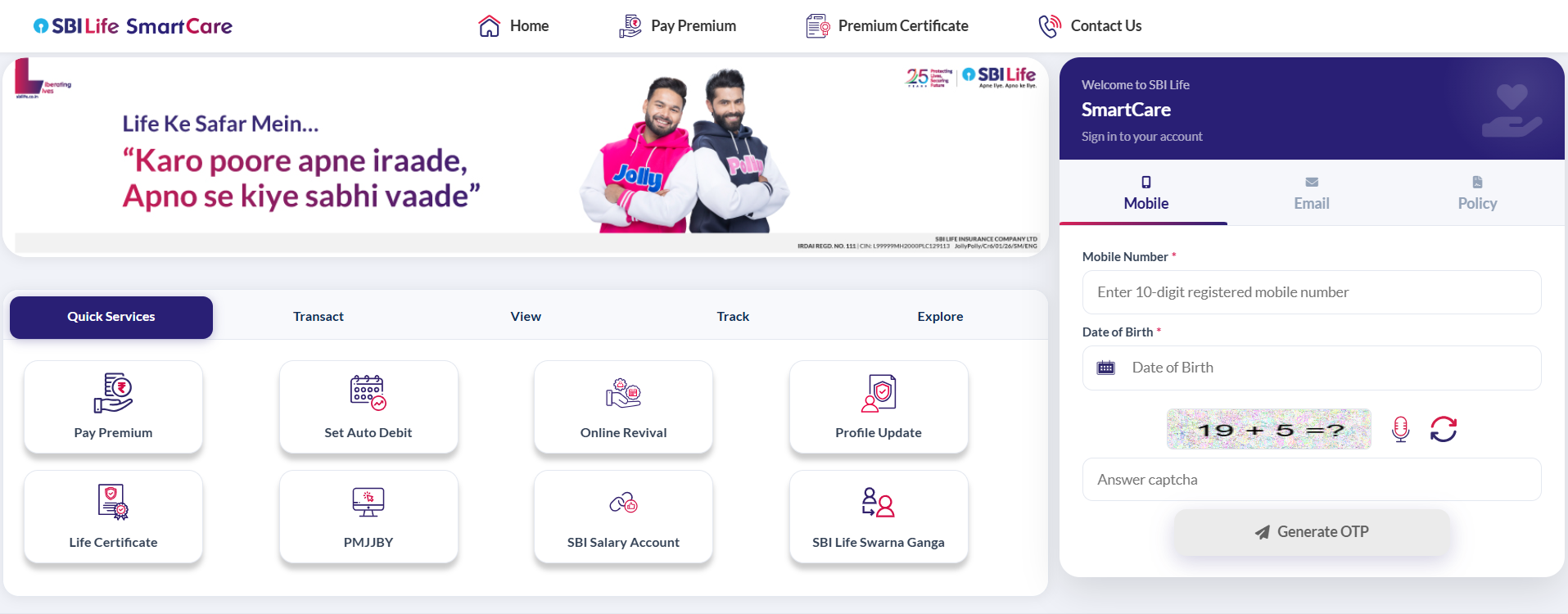
- Step 2: Enter the details along with your date of birth.
- Step 3: Enter the CAPTCHA, then click Generate OTP.
- Step 4: Once logged in, go to your dashboard and select ‘My Policy’ or ‘Enrolled Policies’.
- Step 5: Click on the policy you want to check. You'll see the current status (active, lapsed, and so on), premium due date, fund value for ULIPs (Unit-Linked Insurance Plans), and other details.
If You’re Accessing SmartCare for the First Time
- Step 1: Open SBI Life’s official SmartCare portal and choose Mobile, Email, or Policy as your login method.
- Step 2: Enter your registered mobile number, email address, or policy number, along with your date of birth.
- Step 3: Click Generate OTP. The OTP will be sent to your registered mobile number and email address. NRI customers may receive it on their registered email address.
- Step 4: Enter the OTP to verify your identity.
- Step 5: Create and confirm a six-digit MPIN.
- Step 6: Use this MPIN for quicker and more secure SmartCare logins in the future
Check SBI Life Policy Status by Policy Number
- Via SMS
Send POLSTATUS followed by your policy number to 56161 or 9250001848 from your registered mobile number. You'll get a text back with your policy's current status. - Via WhatsApp
Save SBI Life's WhatsApp number (9029006575) and send a message for policy-related assistance and follow the available menu options.
Note: All of these no-login options work only when you use the mobile number registered with your policy. If you've changed your number since buying the policy, update it first, either through the portal (if you can still log in) or by visiting a branch.
Talk to an expert
today and
find
the right
insurance for you.


Check SBI Life Policy Status via App
Beyond the SmartCare web portal, SBI Life offers a mobile app and a few other login-based ways to track your policy.
1) SBI Life Mobile App
Download the SBI Life SmartCare app from the Play Store or App Store. Register or log in using your policy number and date of birth. From the app, you can check your policy status, view premium due dates, and even pay premiums.
2) Forgot Your Login Details?
If you've forgotten your MPIN, click ‘Forgot MPIN’ on the login page. You'll usually need your login name (or User ID), date of birth, and customer ID or client ID to verify your identity. SBI Life will then send a reset link to your registered email address.
SBI Life Customer Care and Support Contacts
Keep your policy number and date of birth handy when you call. It speeds up verification and gets you a faster answer, whether it's about your policy status, a pending premium, or a claim.
What to Do if Your SBI Life Policy Status Shows Lapsed?
A pure term policy may lapse and lose cover after the grace period (15 days for monthly payments, and 30 days for other modes). However, several savings policies may automatically become reduced paid-up after the minimum required premiums have been paid, retaining reduced benefits.
How to Revive a Lapsed Policy?
You can generally restore your policy's life cover and benefits by starting the revival process within 5 years from the date of your first unpaid premium. Depending on how long the policy has been lapsed, you may need to visit an SBI Life branch or apply online, with:
- Standard Revival Form: A formal request to reinstate your policy.
- Declaration of Good Health (DGH): A self-attested form confirming your current health condition.
- Medical Reports: Needed if the policy has been lapsed for a long time, or if the sum assured is high.
- Identity Proof: A self-attested copy of your ID, such as your PAN card or Aadhaar.
You'll also need to pay all overdue premiums, along with any applicable interest, before SBI Life reinstates your cover. Since revival terms can vary by plan and how long the policy has lapsed, it's a good idea to call SBI Life's customer care or check with your nearest branch to know the exact revival amount before you pay.
Note: Policy revival depends on the insurer’s discretion.
Why Choose Ditto for Life Insurance?
At Ditto, we’ve assisted over 8,00,000 customers with choosing the right insurance policy. Why customers like Aaron below love us:
- No-Spam & No Salesmen
- Rated 4.9/5 on Google Reviews by 30,000+ happy customers
- Backed by Zerodha
- Dedicated Claim Support Team
- 100% Free Consultation
You can book a FREE consultation. Slots are running out, so make sure you book a call or chat on WhatsApp now!
Conclusion
Checking your SBI Life policy status takes just a few minutes, but it can save you from a nasty surprise later, like a missed premium quietly turning into a lapsed policy right when your family needs the cover most. Whether you use the SmartCare portal, the app, SMS, or a quick call to customer care, make it a habit to check in on your policy at least once a year, and definitely right after every premium payment.
If your policy has lapsed, don't wait. Start the revival process as soon as you can, since the longer you wait, the more documentation and cost it may involve. And if you're unsure whether reviving your old policy makes more sense than buying a new one, that's exactly the kind of question our advisors can help you work through, for free.
Frequently Asked Questions
Last updated on: