



Quick Overview
Aditya Birla Health Insurance (ABHI) is one of India’s leading standalone health insurers, known for its innovative, wellness-focused plans and customer-first approach. If you are a policyholder of Aditya Birla Health Insurance, managing your policy is now easier through their online portal. You can log in to view your policy, renew plans, track claims, download documents, and raise service requests, all in one place.
This guide will show you how to access your ABHI account, use the login portal efficiently, and get in touch with customer support whenever needed.
How to Contact Aditya Birla Health Insurance?
Here’s how you can contact Aditya Birla Health Insurance (ABHI) for queries, policy support, claims, grievances, and other assistance in India:
1. Customer Care (Primary Contact)
- Toll-Free Helpline: 1800 270 7000 (24×7 support) — call this number for general enquiries, claims help, renewals, etc.
2. Email Support
3. WhatsApp Support
- WhatsApp Number: +91 88288 00035 — message on WhatsApp for quick responses (don’t call this number).
4. Online & App Support
- Visit the official website’s Contact Us/Support page to submit queries online or find FAQs and branch locators.
- Use the Activ Health mobile app (by Aditya Birla Health Insurance) to access support, raise claims, and get policy info.
Tips When Contacting:
- Always mention your policy number, full name, and registered contact details for faster support.
- For claim status, many prefer email or app support since call hold times can be long.
Aditya Birla Health Insurance: Location-wise Contact Details
Registered Office: Aditya Birla Health Insurance Company Limited
9th Floor, Tower 1One World Centre, Jupiter Mills Compound, 841 Senapati Bapat Marg, Elphinstone Road, Mumbai – 400013, Maharashtra
Aditya Birla Health Insurance: Branch & Regional Offices
Important Notes for Visitors:
- Operating Hours: Most branches operate from 9:30 AM to 6:00 PM (Monday to Saturday). It’s best to call ahead and confirm working hours before visiting.
How to Log in to Aditya Birla Health Insurance: Step-by-Step Guide
You can log in via the Website or the Activ Health App.
Method 1: Website Login
This is the fastest way to access your account without needing to remember a password.
Step 1: Go to the official Aditya Birla Health Insurance login page.
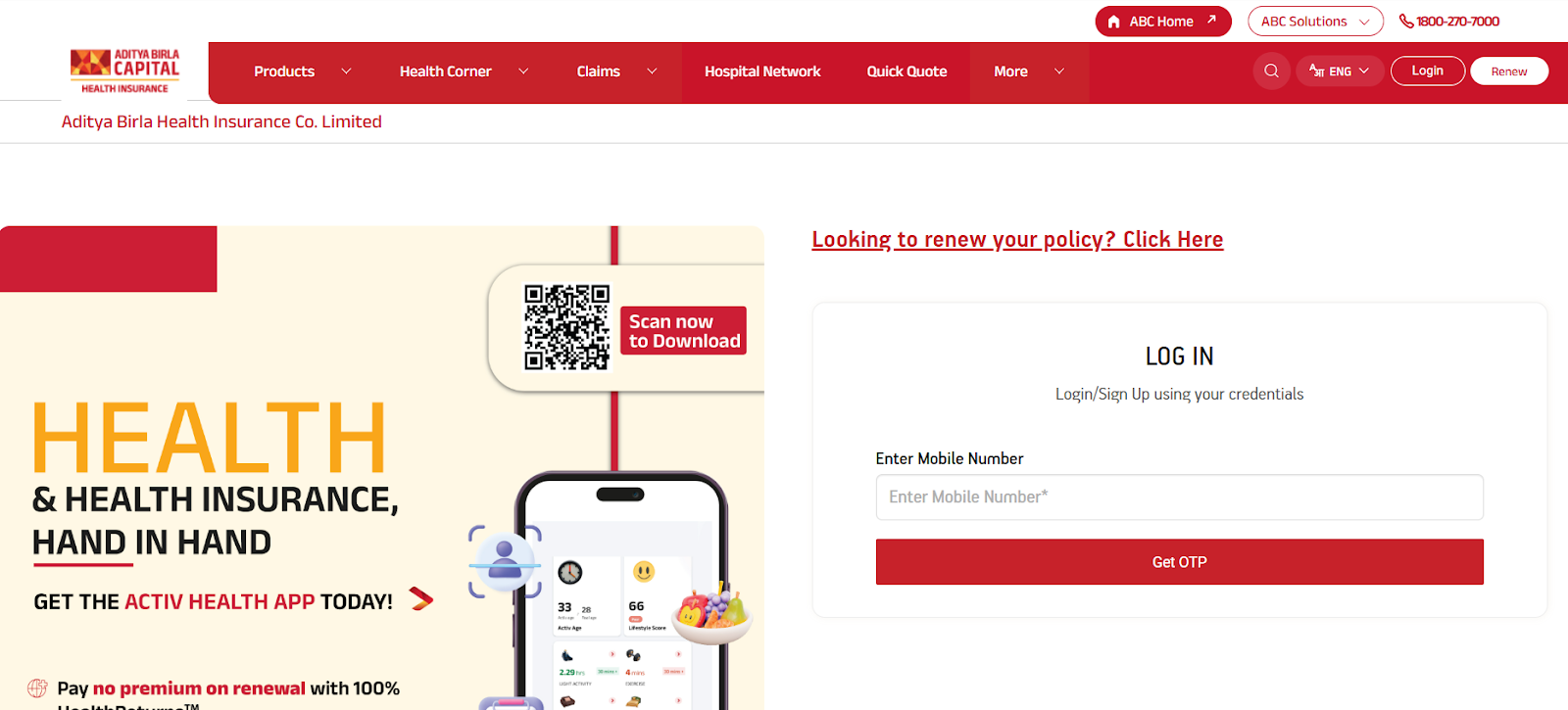
Step 2: Type in the 10-digit mobile number that is registered with your policy.
Step 3: Click on the "Get OTP" button.
Step 4: You will receive a 6-digit One-Time Password (OTP) on your phone. Enter it into the field provided.
Step 5: Click "Login" or "Submit" to access your personal dashboard.
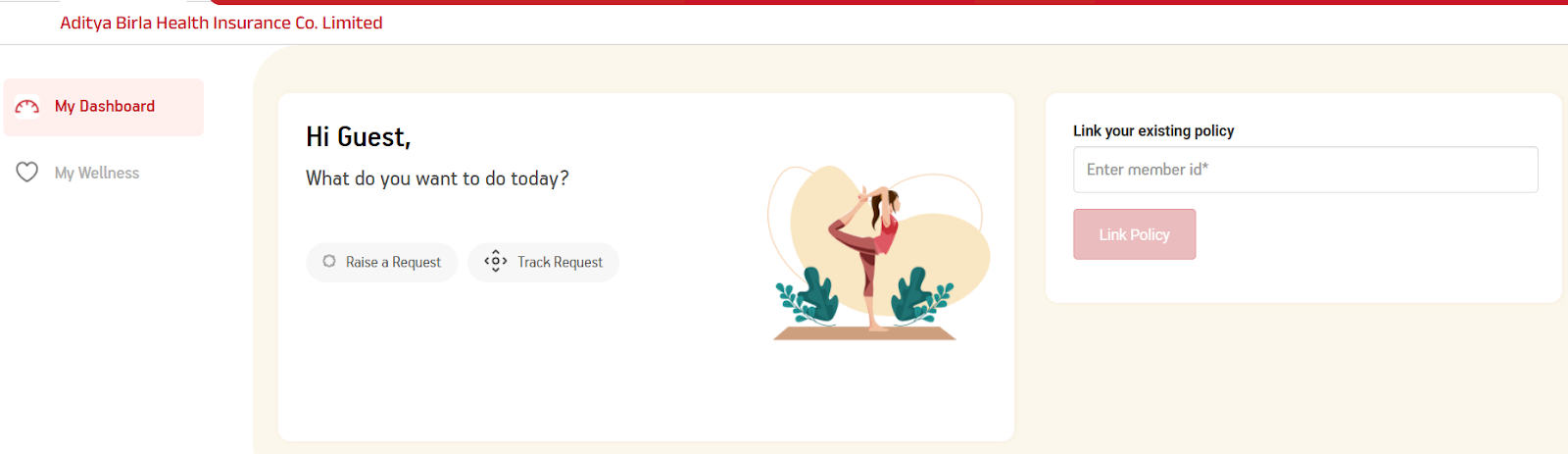
This screen appears after you log in, which requires entering your policy number or policy ID to access complete details related to your health insurance policy.
Method 2: Activ Health Mobile App
The app is best for day-to-day tracking of your "Active Dayz" and fitness rewards.
- Download: Install the Activ Health app from the Google Play Store or Apple App Store.
- Registration: Open the app and enter your registered mobile number.
- OTP Authentication: Enter the OTP sent to your phone.
- Setup (Optional): You can set up a 4-digit mPIN or use Biometric/Fingerprint login for faster access in the future.
What Can You Do After Logging in?
- Download Documents: Get your e-Health Card and 80D Tax Certificate instantly.
- Track Claims: View the real-time status of your hospital bills.
- HealthReturns™: Check how much reward money you have earned for staying active.
- Renewals: Pay your upcoming policy premiums in one click.
Did You Know?

What Services Does Aditya Birla Health Customer Support Offer?
Policy Information & Servicing
Support includes explaining plan benefits, coverage limits, waiting periods, sum insured, endorsements, nominee or contact detail updates, checking policy status, renewals, and downloading policy documents or e-cards.
Claims Assistance & Tracking
Guidance is provided for initiating cashless or reimbursement claims, submitting required documents, and tracking claim status via the Activ Health app, website, or customer care.
Cashless Hospitalization Support
Help with locating network hospitals, understanding pre-authorization requirements, and resolving queries during admission or discharge for cashless treatment.
Coverage, Deductions & Benefit Clarifications
Customer care explains room rent eligibility, deductibles, sub-limits, co-payments, and the use of wellness or reward benefits as per policy terms.
Grievance & Complaint Resolution
Assistance is available to register and escalate service-related complaints through ABHI’s grievance redressal mechanism, including escalation to the Grievance Redressal Officer if required.
Premium, Renewal & Documentation Support
Customers can request premium receipts, renewal confirmations, policy certificates for tax purposes, and assistance with online renewals.
Why Talk to Ditto for Your Health Insurance?
At Ditto, we’ve assisted over 8,00,000 customers with choosing the right insurance policy. Why customers like Rajan below love us:
- No-Spam & No Salesmen
- Rated 4.9/5 on Google Reviews by 15,000+ happy customers
- Backed by Zerodha
- Dedicated Claim Support Team
- 100% Free Consultation
You can book a FREE consultation. Slots are running out, so make sure you book a call now!
Final Thoughts
Aditya Birla health insurance simplifies policy management through its online portal and the Activ Health app. You can track claims, renew your policy, download documents, and update personal details, all from one dashboard, without needing to contact customer care for routine tasks.
Always use the official Aditya Birla health insurance website or the Activ Health app on a secure device to access your policy details. Never share your OTP or login credentials with anyone and remember to log out after checking your policy or claims.
Aditya Birla Health Insurance is one of our partner insurers. If you purchased your policy through us, you can contact us for any assistance or guidance.
Frequently Asked Questions
Last updated on: